
PDC-03 EvoDry PD / RD
Models: EvoDry PD, EvoDry RD
Press the buttons at the same time  and
and  for 2 seconds until the first programme parameter
 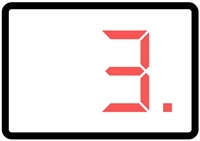 appears in the display window.
With the buttons and  you move up or down among the parameters
Press and hold button to display the parameter value 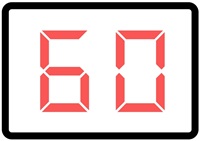
Scroll to the parameter you want to change and then press while pressing to reduce or to increase the value.
The value is automatically saved when you release the button
To exit the programming mode, repeatedly press or past the last parameter then the display shows  for a short while.
The dehumidifier automatically exits programming mode after 5 minutes since the last button press.
Reservation for errors or linguistic discrepancies that may have arisen during printing, translation or assisted text processing. In case of discrepancies between language versions, the original Swedish version applies. See conditions.
 Svenska Svenska
  English (UK)
 Deutsch
 Dansk
Dansk
 Norsk bokmål
 Íslenska
 Suomi
Suomi
 Eesti
Eesti
 Latviešu valoda
 Lietuvių kalba